Securing Windows Access: Eliminating Static Credentials and VPN Over-Privilege with Boundary and Vault
Learn how to eliminate static credentials and VPN over-privilege in Windows with Boundary and Vault. Identity-based access and dynamic secrets reduce exposure risk.
The Persistent Problem of Static Credentials
Despite years of advances in secrets management, many organizations still rely on static credentials to access critical Windows servers and workstations. Commonly used credential types include shared local administrator accounts, long-lived domain accounts, service accounts with fixed passwords, and manually provisioned privileged credentials. Because automated rotation is often missing, these passwords can remain valid for months or even years — an open invitation for attackers.
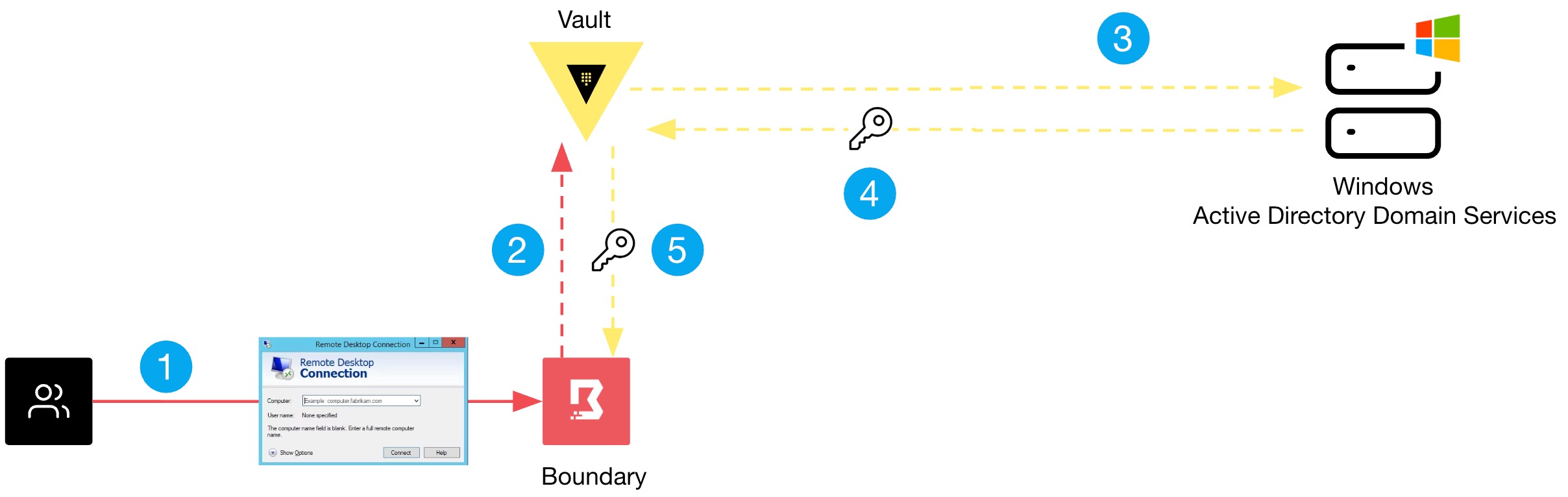
Even when multi-factor authentication (MFA) and directory integrations are in place, many environments still depend on an underlying credential model based on static passwords that are reused across sessions. In Windows environments, shared administrative accounts are frequently used for Remote Desktop Protocol (RDP) access, troubleshooting, and emergency break-glass scenarios. This dramatically increases the risk of credential exposure, a concern that should worry CISO, DevOps, and security teams alike.
The Broad Access Challenge with VPNs
Organizations striving to improve security posture must also address overly broad access. The traditional castle-and-moat approach secures the perimeter with a VPN, but while VPNs provide encrypted connectivity into the network, they make it difficult to restrict lateral movement. Controlling access with firewalls, security groups, and network segmentation relies on IP addresses rather than user identity — a brittle method, especially in modern cloud environments where IP addresses are dynamic and ephemeral.
Additional tools often need to be deployed to enforce finer-grained controls, leading to operational sprawl and management complexity. Traditional VPNs solve connectivity but fail to deliver access control at the user-to-resource level in dynamic environments. Organizations need a solution that addresses both the credential problem and the access problem simultaneously.
A Better Model: Identity-Based Access and Dynamic Credential Management
Boundary fundamentally changes the model by combining authentication and authorization onto a single platform. Instead of granting broad network access, Boundary provides direct access between a user and a target resource based on the user’s identity. Furthermore, Boundary handles credentials on the user’s behalf, eliminating the need for users to ever see or manage static passwords.
How Boundary Works
Boundary uses a controller-worker architecture. The controller manages sessions, policies, and credential brokering; workers are proxies that sit close or on the target resources. When a user authenticates, Boundary verifies their identity and checks authorization policies. If allowed, Boundary creates a secure session directly between the user’s client and the target — without exposing the target network. Credentials are injected dynamically from a secrets store like Vault, ensuring they are short-lived and rotated after each session.
Integrating Vault for Dynamic Credentials
Vault complements Boundary by providing dynamic secrets, encryption, and fine-grained access policies. Integration is straightforward: configure Vault as a credential store in Boundary, define credential libraries for Windows targets (e.g., for local administrator or domain accounts), and let Boundary request a fresh credential from Vault at session start. This ensures that even if a credential is stolen, it is useless for any past or future session.
Configuration Overview
To test this integration, you will need a running Boundary cluster and a Vault instance. Follow these high-level steps:
- Set up Vault – Enable the Active Directory or local secrets engine and define roles that generate temporary Windows credentials.
- Configure Boundary – Create a credential store that points to your Vault instance, then create a credential library referencing the Vault role.
- Define target and policy – In Boundary, create a target (e.g., a Windows server via RDP) and configure a session policy that requires the credential library.
- Connect as a user – Authenticate to Boundary (via OIDC, LDAP, or built-in users), request a session to the target, and Boundary will automatically inject the dynamic credential from Vault into the RDP session.
Detailed step-by-step guides are available in the official Boundary documentation.
Conclusion
By combining Boundary’s identity-based access with Vault’s dynamic secrets, organizations can eliminate static credentials and overly broad network access in Windows environments. This approach reduces the attack surface, simplifies compliance, and gives security teams granular control over who accesses what — and with what credentials. Moving to this model is a critical step in modernizing enterprise security.